


Listing Optimiser: Know Where You Stand, and What to Do Next #
Listing Optimiser is a dashboard in AgentNet that shows you how a listing compares to the competition, what’s actually driving your leads, and exactly what to focus on next. It brings together market visibility, a ranked action plan, and performance tracking in one place — taking the guesswork out of a listing’s performance so you can act with confidence, whether that listing is already winning or working to catch up.
How Does Listing Optimiser Work? #
Listing Optimiser comes with the following core features:
- Market
- Recommendations
- Statistics
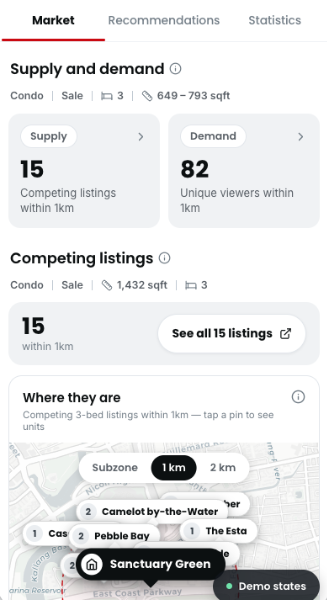
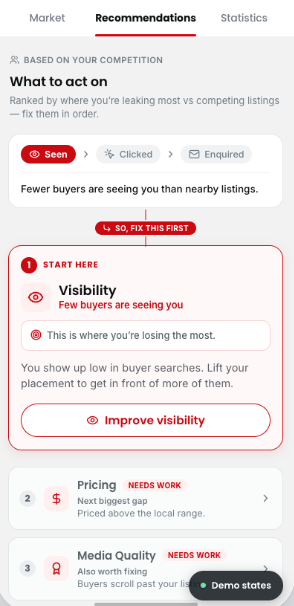
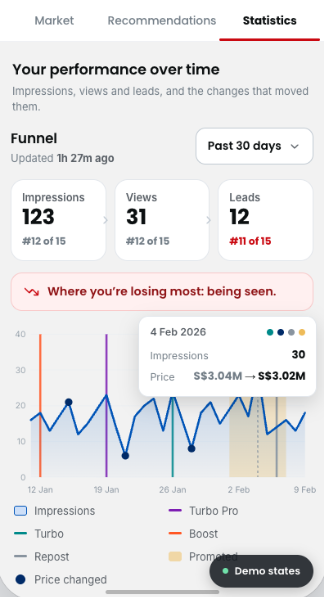
Market
- Supply — see your competition
- See competing listings within your area (radius: [PENDING confirmation]), plotted so you know exactly who a buyer is comparing you to.
- Demand — real buyer interest
- See unique views in the past 7 days, along with the peak times buyers are actually viewing listings like yours.
- Filter competing listings by most relevant, lowest price, highest price, or newest.
Recommendations #
- A ranked action plan, not a generic checklist
- Recommendations are ranked by impact, so you always know what to focus on first.
- Three dimensions
- Visibility — are buyers finding you? See how you’re showing up in search, and which ad tools (e.g. Turbo, Boost) can help.
- Pricing — see if your asking price is above or below the local range, before a buyer notices.
- Media quality — spot the photos that might be costing you clicks
Statistics #
- Hourly data, for up to 180 days
- Impressions, views, and leads are tracked on a close-to-hourly basis, so you’re not waiting days to see how a listing is doing.
- See the impact of ad tools
- Track how tools like Boost, Turbo, Turbo Pro, Repost, or Promoted Listings affected your numbers.
- Built on Listing Performance Insights
- Statistics includes everything Listing Performance Insights showed you — now as part of the fuller Listing Optimiser picture.
How to Access Listing Optimiser
#
Explore Recommendations, ranked by impact across visibility, pricing, and media quality.
- On your AgentNet, visit Listings > click “Listing Optimiser” on any listing. [PENDING confirmation of exact tab/entry-point naming]
- Check Market to see how your listing compares to nearby competition, and how much buyer interest there is.
- Review your Recommendations, ranked by impact — visibility, pricing, or media quality.
- Check Statistics to track impressions, views, and leads over time, and see what moved them.