

-
Step 1Open your eCapitaVoucher balance
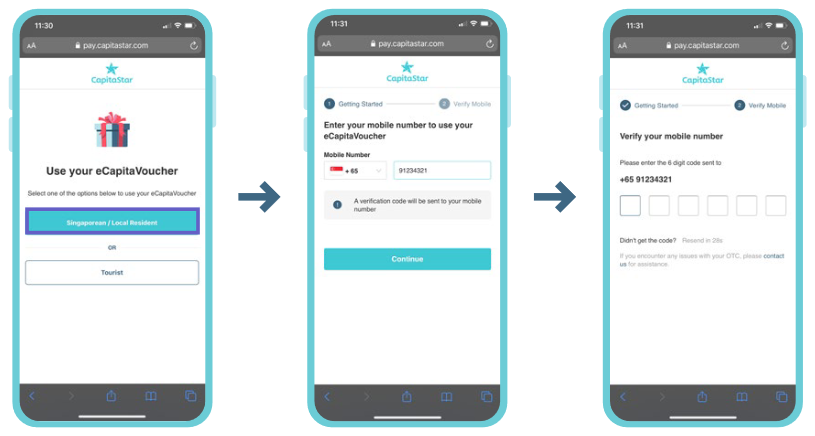
In the CapitaStar App, tap the eCapitaVoucher balance at the top of the screen, then tap Accept Gift.
-
Step 2Enter your Activation Code
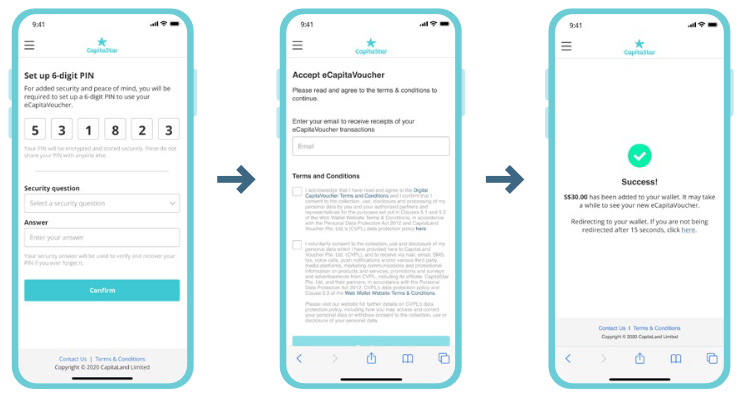
Enter the eCapitaVoucher Activation Code (16 alphanumeric characters) and tap Accept Gift. You'll see a confirmation once the voucher is added to your balance.
It may take a short while for the new eCapitaVoucher to show in your balance.
-
Step 1
Open the acceptance link and sign up #
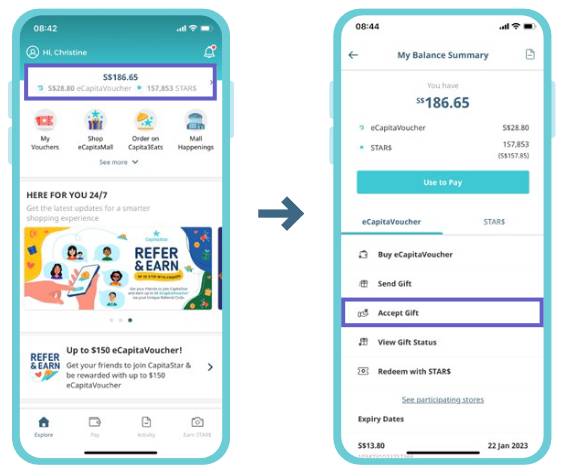
Tap the eCapitaVoucher Acceptance Link in your SMS — it opens the Web Wallet at pay.capitastar.com. Select Singaporean / Local Resident, enter your local mobile number, and verify it with the 6-digit code sent to you.
-
Step 2
Complete the first-time setup #
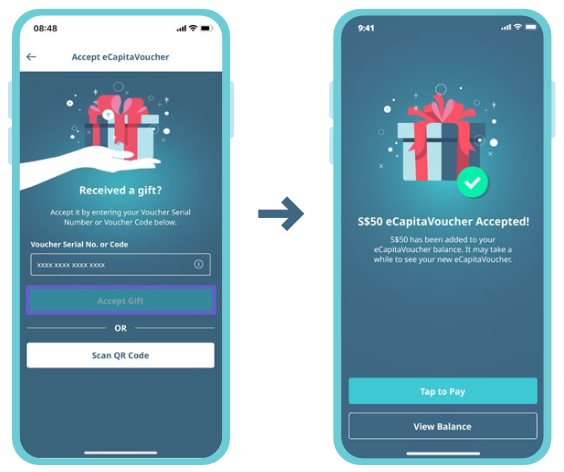
Set up a 6-digit wallet PIN (used to verify your Web Wallet transactions) and enter your email address to receive transaction receipts. Then accept the T&Cs — the first set is mandatory, the second is optional. You'll see a Success screen once the voucher is added to your wallet.
Already set up the Web Wallet before? You'll skip straight to the confirmation.