Back to Data Tools
AGENT HELP CENTRE

Listing Optimizer

What is Listing Optimizer ?

Last update: August 26, 2026

Listing Optimiser: Know Where You Stand, and What to Do Next  #

Listing Optimiser is a dashboard in AgentNet that shows you how a listing compares to the competition, what’s actually driving your leads, and exactly what to focus on next. It brings together market visibility, a ranked action plan, and performance tracking in one place — taking the guesswork out of a listing’s performance so you can act with confidence, whether that listing is already winning or working to catch up. 

How Does Listing Optimiser Work?  #

Listing Optimiser comes with the following core features: 

  • Market 
  • Recommendations 
  • Statistics 

Market
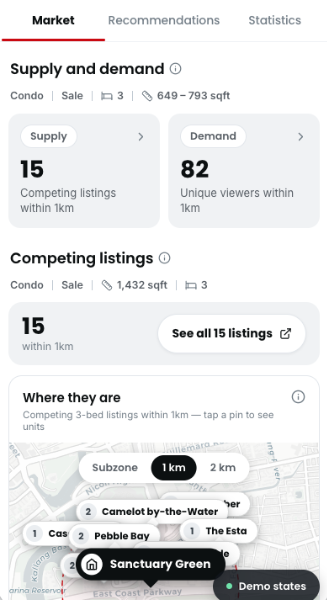
Supply — see your competition

Demand — real buyer interest
  
Availability
All agent packages
Duration
7 days per activation
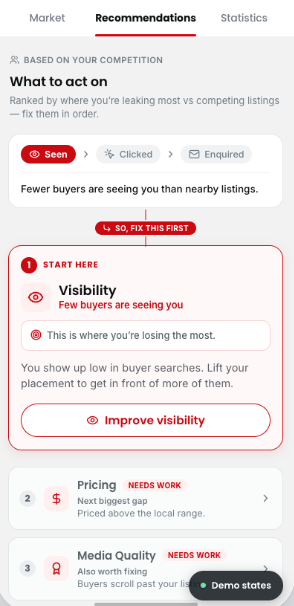
A ranked action plan, not a generic checklist
Recommendations are ranked by impact, so you always know what to focus on first.
Three dimensions
All agent packages
Duration
7 days per activation
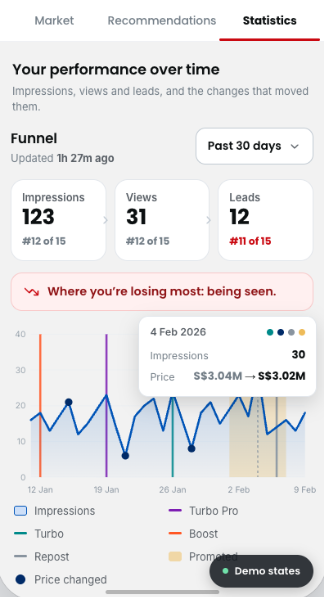
Hourly data, for up to 180 days
Impressions, views, and leads are tracked on a close-to-hourly basis, so you’re not waiting days to see how a listing is doing.
See the impact of ad tools
Track how tools like Boost, Turbo, Turbo Pro, Repost, or Promoted Listings affected your numbers.
Built on Listing Performance Insights
Statistics includes everything Listing Performance Insights showed you — now as part of the fuller Listing Optimiser picture.


  Market

  • Supply — see your competition  
    • See competing listings within your area (radius: [PENDING confirmation]), plotted so you know exactly who a buyer is comparing you to. 
  • Demand — real buyer interest  
    • See unique views in the past 7 days, along with the peak times buyers are actually viewing listings like yours. 
    • Filter competing listings by most relevant, lowest price, highest price, or newest. 

Recommendations  #

  • A ranked action plan, not a generic checklist  
    • Recommendations are ranked by impact, so you always know what to focus on first. 
  • Three dimensions  
    • Visibility — are buyers finding you? See how you’re showing up in search, and which ad tools (e.g. Turbo, Boost) can help. 
    • Pricing — see if your asking price is above or below the local range, before a buyer notices. 
    • Media quality — spot the photos that might be costing you clicks

Statistics  #

  • Hourly data, for up to 180 days  
    • Impressions, views, and leads are tracked on a close-to-hourly basis, so you’re not waiting days to see how a listing is doing. 
  • See the impact of ad tools  
    • Track how tools like Boost, Turbo, Turbo Pro, Repost, or Promoted Listings affected your numbers. 
  • Built on Listing Performance Insights  
    • Statistics includes everything Listing Performance Insights showed you — now as part of the fuller Listing Optimiser picture. 

How to Access Listing Optimiser 


#

Explore Recommendations, ranked by impact across visibility, pricing, and media quality.

  1. On your AgentNet, visit Listings > click “Listing Optimiser” on any listing. [PENDING confirmation of exact tab/entry-point naming] 
  2. Check Market to see how your listing compares to nearby competition, and how much buyer interest there is. 
  3. Review your Recommendations, ranked by impact — visibility, pricing, or media quality. 
  4. Check Statistics to track impressions, views, and leads over time, and see what moved them. 


Frequently Asked Questions 

Is Boost always on for Platinum agents?

Yes. All listings on a Platinum package are Boosted automatically. No manual activation or Ad Credits are needed.

Where can I find Listing Optimiser?

It’s available under AgentNet > Listings. Click into any listing, active or expired, to access it.

Is Listing Optimiser available for all my listings, or only certain tiers?

Available for all your listings, so you can optimise every property in your portfolio, regardless of the product used.

[PENDING — confirm whether this also holds for agent subscription tier, not just listing type]

How is this different from Listing Performance Insights?

Listing Performance Insights’ metrics — impressions, views, and leads — are now part of Listing Optimiser’s Statistics feature, alongside two new features: Market and Recommendations.

Do I need to act on every recommendation?

No — recommendations are ranked so you can prioritise. Start with the highest-impact one and work down.

Is this only useful if my listing isn't performing well?

No. Listing Optimiser works for every listing, whatever stage it’s at:

  • If your listing is already performing well or on par with competitors, use Market and Statistics to monitor your position and catch any shift early. 
  • If it’s performing behind, head to Recommendations for a specific, ranked fix.


Can I use this to show sellers how their listing is doing?

Yes. The data can help you explain performance trends, support pricing discussions, or strengthen your case in situations like HDB appeals.

What dates does the date picker support?

Quick shortcuts are available, with a default of the last 7 days, plus options for the past 30, 60, and 180 days. A custom range picker is also available, supporting selections up to the past 180 days.

Was this article helpful?

Still need help?

Our support team is available to assist you with the technical queries.